ADAM

Overview
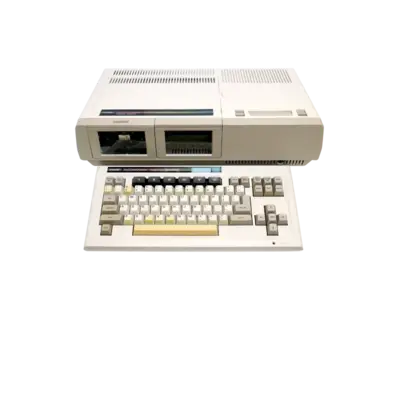
The Coleco ADAM was Coleco’s attempt to extend the ColecoVision ecosystem into the home computer space. Launched in October 1983 at roughly $725 USD (around $1,800 today), it combined a keyboard, printer and digital data pack drives with the existing ColecoVision cartridge slot. Production issues and fierce competition meant it disappeared in early 1985, yet it remains a distinctive hybrid of console and computer design.
REG-Linux represents the ADAM through the adam system group so metadata scraping and theming can surface a dedicated visual set when the current theme offers one.
Technical specifications
- Manufacturer: Coleco
- Release year: 1983
- Hardware type: computer
Supported ROM extensions
wav, ddp, mfi, dfi, hfe, mfm, td0, imd, d77, d88, 1dd, cqm, cqi, dsk, rom, col, bin, zip, 7z
Quick reference
- Emulator: MAME
- ROM folder:
/userdata/roms/adam - Accepted formats:
.wav,.ddp,.mfi,.dfi,.hfe,.mfm,.td0,.imd,.d77,.d88,.1dd,.cqm,.cqi,.dsk,.rom,.col,.bin,.zip,.7z - System group:
adam - Required BIOS sets:
adam,adam_ddp,adam_fdc,adam_kb,adam_prn
BIOS
MAME needs the following BIOS ROM sets (ZIP or 7Z) placed in either the /userdata/roms/adam folder or the shared BIOS directory:
adamadam_ddpadam_fdcadam_kbadam_prn
These provide firmware for the base unit, digital data packs, disk controller, keyboard and printer. Without them the system cannot boot.
ROMs
Store Coleco ADAM software in /userdata/roms/adam. MAME can read cassette images, disk dumps and cartridge binaries from the formats listed above. Archives such as .zip and .7z may contain multiple titles, and MAME will automatically select the appropriate file when launching the driver.
Emulators
MAME
MAME powers ADAM emulation in REG-Linux. Unlike libretro-based setups, the ROM set itself associates with the correct MAME driver, so matching versions of ROMs and MAME builds remains important. For general guidance on using MAME within REG-Linux, refer to the arcade guide.
Accessing MAME settings
While a game is running, open MAME’s UI menu with [HOTKEY] + south button or [Tab] on a keyboard. This menu lets you remap controls, tweak video options, change dip switches where applicable and adjust other per-game settings.
Standardized REG-Linux features available for this system are adam.videomode, adam.decoration, adam.padtokeyboard.
| ES setting name REG-Linux.conf_key | Description => ES option key_value |
|---|---|
| Settings that apply to all versions of this emulator | |
VIDEO MODE adam.video |
Choose the renderer. BGFX enables shader-based post-processing, while Accel/OpenGL provide more direct paths. => BGFX bgfx, Accel accel, OpenGL opengl. |
BGFX GRAPHICS API adam.bgfxbackend |
Used when VIDEO MODE is set to BGFX; selects the graphics API. => MAME Detect automatic, OpenGL opengl, OpenGL ES gles, Vulkan vulkan. |
BGFX VIDEO FILTER adam.bgfxshaders |
Applies CRT-like or scaling filters from the BGFX shader list. => Off None, Bilinear default, CRT Geom crt-geom, CRT Geom Deluxe crt-geom-deluxe, Super Eagle eagle, HLSL hlsl, HQ2X hq2x, HQ3X hq3x, HQ4X hq4x. |
CRT SWITCHRES adam.switchres |
Enables SwitchRes profiles for real CRT displays. Leave Off unless using a CRT. => Off 0, On 1. |
VERTICAL ROTATION (TATE) adam.rotation |
Rotates the video output 90°/270° for vertical (TATE) displays. => Off None, Rotate 90 autoror, Rotate 270 autorol. |
ALT DPAD MODE adam.altdpad |
Adjusts the D-pad orientation for different controller stacks. => Off (Default) 0, DS3 Orientation 1, X360 Orientation 2. |
SPECIAL CONTROL LAYOUTS adam.altlayout |
Offers alternate layouts for fighters, twin sticks and other control schemes. => Default Only 0, Street Fighter (SNES) 1, Street Fighter (Modern) 4, Mortal Kombat (SNES) 2, Killer Instinct (SNES) 3, Genesis 6-Button (Retroarch) 5, Neo Geo 6-Button (Retro Mini Pad) 6, Neo Geo (Offset Fightstick) 7, Twin Stick with Triggers 8, Rotated 4-Way Stick (Q*Bert) 9. |
| Settings specific to ADAM | |
MEDIA TYPE adam.altromtype |
Selects which internal slot MAME uses (cassette, disk or cartridge). => Cassette 1 cass1, Cassette 2 cass2, Disk (Drive 1) flop1, Disk (Drive 2) flop2, Cartridge (Slot 1) cart1, Cartridge (Slot 2) cart2, Cartridge (Slot 3) cart3, Cartridge (Slot 4) cart4. |
UI KEYS adam.enableui |
Enable MAME’s UI keybindings at startup. Toggle with hotkey + D-pad up or Scroll Lock. => Off at Start 0, On at Start 1. |
Controls
Default Coleco ADAM controls map to a REG-Linux Retropad:

If necessary, remap inputs through EmulationStation’s MAME settings or via MAME’s own in-game menu.
Troubleshooting
- Refer to the MAME systems page for driver-specific issues.
- Consult upstream MAMEdev documentation for configuration and ROM matching information.