Amiga AGA

Overview
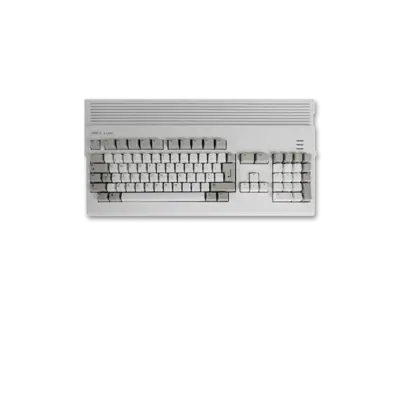
The Amiga 1200 sits in the “Advanced Graphics Architecture” (AGA) generation of Commodore’s home computers. Its debut in 1992 made it the most affordable AGA model, combining a Motorola 68EC020 CPU with the richer colour capabilities of AGA graphics while remaining firmly in the home segment. Commodore offered more powerful tower models such as the Amiga 4000 and the AGA line replaced the earlier OCS/ECS chipset machines such as the Amiga 500.
REG-Linux treats this profile as part of the general amiga group while using the amiga1200 artwork set when supported by the active theme.
Technical specifications
- CPU: Motorola 68EC020 at 14 MHz (32-bit internal, 24-bit address)
- RAM: 2 MB Chip RAM standard (expandable with Fast RAM via CPU slot; 8+ MB common)
- Display: AGA chipset supporting 256 colours at 320×256/512×256 and 262,144 colour HAM-8 from a 16.8-million-colour palette
- Sound: Paula audio engine with four-channel stereo PCM matching other ECS/AGA machines
Supported ROM extensions
adf, uae, ipf, dms, dmz, adz, lha, hdf, exe, m3u, zip, raw, scp
Quick reference
- ROM folder:
/userdata/roms/amiga1200 - Accepted formats:
.adf,.uae,.ipf,.dms,.dmz,.adz,.lha,.hdf,.exe,.m3u,.zip - Emulators: amiberry, libretro: puae/puae2021/uae4arm
- System group:
amiga
| Emulator | Notes |
|---|---|
| amiberry (A1200 / A4000) | Lightweight optimized emulator suited to single-board computers. |
| libretro: puae / puae2021 / uae4arm | RetroArch cores that share hotkeys, shaders and overlays with other libretro systems. |
BIOS
At minimum place bios/amiga/kick40068.A1200 in your BIOS folder to boot Amiga 1200 software. The additional Kickstart ROMs below allow emulating other AGA machines or exploring a wider range of OS revisions:
| MD5 checksum | Share file path | Description |
|---|---|---|
b7cc148386aa631136f510cd29e42fc3 |
bios/amiga/kick39106.A1200 |
Kickstart v3.0 rev 39.106 (AmigaOS 3.0) |
646773759326fbac3b2311fd8c8793ee |
bios/amiga/kick40068.A1200 |
Kickstart v3.1 rev 40.068 (AmigaOS 3.1) |
9bdedde6a4f33555b4a270c8ca53297d |
bios/amiga/kick40068.A4000 |
Kickstart v3.1 rev 40.068 (AmigaOS 3.1, A4000) |
b7cc148386aa631136f510cd29e42fc3 |
bios/amiga/amiga-os-300-a1200.rom |
Alternate Kickstart v3.0 image |
646773759326fbac3b2311fd8c8793ee |
bios/amiga/amiga-os-310-a1200.rom |
Alternate Kickstart v3.1 image |
413590e50098a056cfec418d3df0212d |
bios/amiga/amiga-os-310-a3000.rom |
Kickstart v3.1 rev 40.068 (Amiga 3000) |
9bdedde6a4f33555b4a270c8ca53297d |
bios/amiga/amiga-os-310-a4000.rom |
Kickstart v3.1 rev 40.068 (Amiga 4000) |
730888fb1bd9a3606d51f772ed136528 |
bios/amiga/amiga-os-310.rom |
Alternative Kickstart v3.1 (Commodore/Cloanto) |
The Kickstart v3.1 rev 40.068 ROM (kick40068) is the most commonly used file for AGA titles.
ROMs
Store Amiga 1200 titles in /userdata/roms/amiga1200. The accepted filetypes cover floppy dumps, emulator archives and WHDLoad packages; REG-Linux routes each file to the appropriate emulator based on the system tag.
Emulators
amiberry
Amiberry is designed for accurante and efficient execution. It exposes similar standardized features (amiga1200.videomode, amiga1200.padtokeyboard, etc.) plus options for line mode, resolution, scaling and flicker reduction.
Common GUI options for Amiberry
| ES setting name REG-Linux.conf_key | Description => ES option key_value |
|---|---|
LINE MODE amiga1200.amiberry_linemode |
Adjust how scanlines are drawn. => SINGLE none, DOUBLE double, SCANLINES scanlines. |
VIDEO RESOLUTION amiga1200.amiberry_resolution |
Selects an internal rendering resolution. => Low lores, High hires, Super high superhires. |
SCALING METHOD amiga1200.amiberry_scalingmethod |
Controls pixel scaling/filtering. => Automatic automatic, Pixelated pixelated, Smooth smooth. |
REMOVE INTERLACE ARTIFACTS amiga1200.amiberry_flickerfixer |
Reduces flicker on static screens. => ON True, OFF False. |
AUTO HEIGHT amiga1200.amiberry_auto_height |
Auto adjust the screen height. => ON True, OFF False. |
RetroArch
RetroArch hosts the libretro cores for Amiga emulation. While RetroArch supplies global features (shaders, overlays, rewind, etc.), each core exposes its own configuration. Open the Quick Menu ([HOTKEY] + south face button) to tweak options or remap inputs.
libretro: puae
PUAE is a highly accurate Amiga core that supports a wide range of models, CPU modes, video standards and per-core tweaks. REG-Linux exposes standard hooks such as amiga1200.rewind, amiga1200.autosave and amiga1200.padtokeyboard.
| ES setting name REG-Linux.conf_key | Description => ES option key_value |
|---|---|
AMIGA MODEL global.puae_model |
Force a specific Amiga model. => Autodetect automatic, A1200 A1200, A4000/040 A4040, CD32 CD32, etc. |
CPU COMPATIBILITY global.cpu_compatibility |
Improves compatibility for problematic titles. => Normal normal, More compatible compatible, Cycle-exact exact. |
CPU MULTIPLIER global.cpu_multiplier |
Runs the emulated CPU faster (doubles per increment). |
VIDEO STANDARD global.video_standard |
Toggle PAL/NTSC timing. => PAL PAL, NTSC NTSC. |
VIDEO RESOLUTION global.video_resolution |
Controls the internal resolution. => Low lores, High hires, Super-high superhires. |
ZOOM MODE global.zoom_mode |
Crops or expands the framebuffer to various sizes. |
FRAMESKIP global.gfx_framerate |
Skip frames for performance. |
WHDLOAD LAUNCHER amiga1200.whdload |
Enables WHDLoad menu support. |
Additional core options cover floppy turbo, controller mappings, joystick types, and other Amiga-wide features described in the RetroArch core documentation.
libretro: puae2021
Puae2021 is a lighter, less accurate variant suitable for low-power systems. It exposes the same configuration keys as puae, including amiga1200.keyrah_mapping, amiga1200.disable_joystick, and other model-specific toggles.
libretro: uae4arm
Uae4arm is another libretro Amiga core that follows the same general conventions. REG-Linux treats it like the other libretro options but currently does not expose a dedicated configuration table in documentation.
Controls
Here are the default Amiga 1200 controls mapped onto a REG-Linux Retropad:

When using libretro: puae/puae2021 you can remap per-game inputs through the RetroArch Quick Menu or the input remapping guide.
Troubleshooting
- Verify Kickstart ROM filenames and MD5 checksums if games refuse to boot.
- Keep Amiga titles inside
/userdata/roms/amiga1200and match the file format to the chosen emulator/core. - Ensure the selected core/table supports the format you load (e.g., WHDLoad packages require WHDLoad support).
- For advanced Amiga-specific bugs, consult the upstream emulator and libretro documentation.