Amiga OCS/ECS

Overview
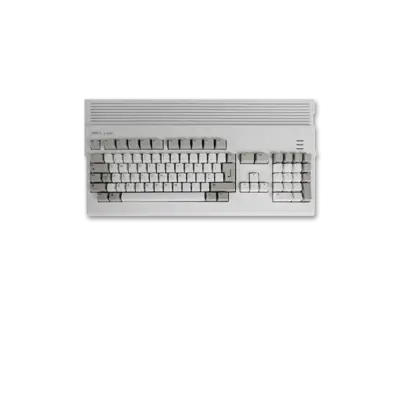
The Amiga 500 is the most iconic member of the Original Chip Set (OCS) generation and sits alongside its Enhanced Chip Set (ECS) siblings such as the Amiga 600, 1000, 2000 and 3000. Its Motorola 68000 CPU plus Paula/OCS graphics and sound made it one of the defining home computers of the late 1980s. REG-Linux treats the entire OCS/ECS range as the amiga group while using the amiga500 artwork set when the theme offers it.
Technical specifications
- CPU: Motorola 68000 at approximately 7.16 MHz (NTSC) / 7.09 MHz (PAL)
- Memory: 512 KB Chip RAM stock, expandable with Fast RAM
- Display: OCS/ECS chipset supporting 32 colors (4096 palette) at 320×256 plus HAM modes and interlaced support
- Sound: Paula chip with four-channel stereo PCM up to 28 kHz
Supported ROM extensions
adf, uae, ipf, dms, dmz, adz, lha, hdf, exe, m3u, zip, raw, scp
Quick reference
- ROM folder:
/userdata/roms/amiga500 - Accepted formats:
.adf,.uae,.ipf,.dms,.dmz,.adz,.lha,.hdf,.exe,.m3u,.zip - Emulators: amiberry, libretro: puae / puae2021 / uae4arm
- System group:
amiga
| Emulator | Notes |
|---|---|
| amiberry (A500/A500+/A600/A1000) | Lightweight, performance-optimized emulator suited to SBCs and single-board targets. |
| libretro: puae / puae2021 / uae4arm | RetroArch cores that share hotkeys, shaders and overlays with other systems. |
BIOS
For Amiga 500 titles the essential Kickstart ROM is bios/amiga/kick34005.A500. Additional Kickstart dumps expand compatibility with later models or alternate OS revisions:
| MD5 checksum | Share file path | Description |
|---|---|---|
85ad74194e87c08904327de1a9443b7a |
bios/amiga/kick33180.A500 |
Kickstart v1.2 rev 33.180 (AmigaOS 1.2) |
82a21c1890cae844b3df741f2762d48d |
bios/amiga/kick34005.A500 |
Kickstart v1.3 rev 34.005 (AmigaOS 1.3) |
dc10d7bdd1b6f450773dfb558477c230 |
bios/amiga/kick37175.A500 |
Kickstart v2.04 rev 37.175 (AmigaOS 2.04) |
465646c9b6729f77eea5314d1f057951 |
bios/amiga/kick37350.A600 |
Kickstart v2.05 rev 37.350 (AmigaOS 2.05) |
e40a5dfb3d017ba8779faba30cbd1c8e |
bios/amiga/kick40063.A600 |
Kickstart v3.1 rev 40.063 (AmigaOS 3.1) |
85ad74194e87c08904327de1a9443b7a |
bios/amiga/amiga-os-120.rom |
Alternate v1.2 ROM image |
82a21c1890cae844b3df741f2762d48d |
bios/amiga/amiga-os-130.rom |
Alternate v1.3 ROM image |
dc10d7bdd1b6f450773dfb558477c230 |
bios/amiga/amiga-os-204.rom |
Alternate v2.04 ROM image |
465646c9b6729f77eea5314d1f057951 |
bios/amiga/amiga-os-205.rom |
Alternate v2.05 ROM image |
e40a5dfb3d017ba8779faba30cbd1c8e |
bios/amiga/amiga-os-310-a600.rom |
Alternate v3.1 ROM image |
ROMs
Store Amiga OCS/ECS images in /userdata/roms/amiga500. When working with multi-disk releases you can bundle the disks inside a ZIP archive and append (MD) to the archive name. For example:
roms/amiga500/
     ├─ Operation Wolf (Disk 1).adf
     └─ Operation Wolf (Disk 2).adf
Compress the two discs into Operation Wolf (MD).zip and RetroArch will expose the multi-disk menu from its Quick Menu ([HOTKEY] + south button) so you can swap discs without renaming files.
Emulators
amiberry
Amiberry is tuned for performance on single-board computers while exposing many of the same configuration keys. Standard features include amiga500.videomode, amiga500.ratio and amiga500.padtokeyboard.
Amiberry options table
| ES setting name REG-Linux.conf_key | Description => ES option key_value |
|---|---|
LINE MODE amiga500.amiberry_linemode |
Controls how scanlines are drawn. => SINGLE none, DOUBLE double, SCANLINES scanlines. |
VIDEO RESOLUTION amiga500.amiberry_resolution |
Selects an internal rendering resolution. => Low lores, High hires, Super high superhires. |
SCALING METHOD amiga500.amiberry_scalingmethod |
Manages pixel filtering/smoothing. => Automatic automatic, Pixelated pixelated, Smooth smooth. |
REMOVE INTERLACE ARTIFACTS amiga500.amiberry_flickerfixer |
Reduce flicker on static screens. => ON True, OFF False. |
AUTO HEIGHT amiga500.amiberry_auto_height |
Auto-adjusts screen height. => ON True, OFF False. |
RetroArch
RetroArch runs the libretro cores for Amiga emulation and shares its features (shaders, overlays, rewind, etc.) across systems. Open the Quick Menu ([HOTKEY] + south button) to tweak per-core options.
libretro: puae
| ES setting name REG-Linux.conf_key | Description => ES option key_value |
|---|---|
AMIGA MODEL global.puae_model |
Force a specific Amiga model. => Autodetect automatic, A500 A500, A500+ A500PLUS, A600 A600, A1200 A1200, A4000/040 A4040, CDTV CDTV, CD32 CD32, etc. |
CPU COMPATIBILITY global.cpu_compatibility |
Improve compatibility for tricky titles. => Normal normal, More compatible compatible, Cycle-exact exact. |
CPU MULTIPLIER global.cpu_multiplier |
Increase CPU speed (1 increment ≈ double). |
VIDEO STANDARD global.video_standard |
Swap PAL/NTSC timing. => PAL PAL, NTSC NTSC. |
VIDEO RESOLUTION global.video_resolution |
Choose an internal resolution. => Low lores, High hires, Super-high superhires. |
ZOOM MODE global.zoom_mode |
Crop or expand viewports. |
FRAMESKIP global.gfx_framerate |
Skip frames for smoother performance. |
WHDLOAD LAUNCHER amiga500.whdload |
Launch pre-installed WHDLoad titles. |
FLOPPY TURBO SPEED amiga500.puae_floppy_speed |
Reduce floppy wait but may introduce glitches. => Off 100, On 0. |
2P GAMEPAD MAPPING amiga500.keyrah_mapping |
Keypad-to-joyport mapping for two players. |
JUMP ON B amiga500.pad_options |
Sends second fire button as Up. |
DISABLE EMULATOR JOYSTICK amiga500.disable_joystick |
Passes all keyboard events through to the emulated system. |
CONTROLLER 1 TYPE amiga500.controller1_puae |
Choose controller type for Player 1. |
CONTROLLER 2 TYPE amiga500.controller2_puae |
Choose controller type for Player 2. |
Other libretro cores such as puae2021 and uae4arm expose largely the same key set with slightly different balances for speed vs accuracy.
Controls
Here are the default Amiga controls mapped to a REG-Linux Retropad:

Per-game remapping can be done via RetroArch’s Quick Menu or by editing the core options using the input remapping guide.
Troubleshooting
- Double-check Kickstart filenames and MD5 hashes when games refuse to boot.
- Ensure games live inside
/userdata/roms/amiga500and the emulator you selected supports the file type you supplied. - The upstream emulator documentation (amiberry, RetroArch/libretro) is useful for advanced performance or compatibility tuning.