Archimedes

Overview
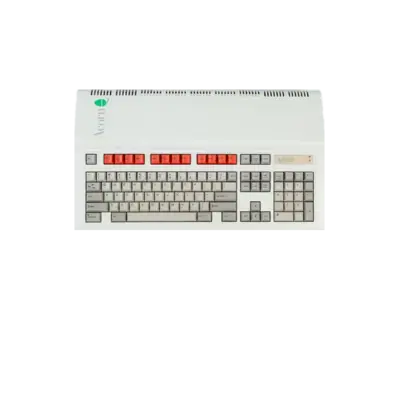
The Acorn Archimedes family, released in 1987 by Acorn Computers, is among the first home platforms built around ARM processors. These machines ran RISC OS, dominated UK educational markets and offered a fast BBC BASIC environment that made them a favourite for developers and enthusiasts.
REG-Linux identifies Archimedes titles via the archimedes system group so compatible themes can surface the related artwork set.
Technical specifications
- Manufacturer: Acorn Computers
- Release year: 1987
- Hardware type: computer
- CPU: ARM2 at 8 MHz (Archimedes 300/310/440) and successor models
- OS: RISC OS 3.x
Supported ROM extensions
mfi, dfi, hfe, mfm, td0, imd, d77, d88, 1dd, cqm, cqi, dsk, ima, img, ufi, 360, ipf, adf, apd, jfd, ads, adm, adl, ssd, bbc, dsd, st, msa, chd, zip, 7z
Quick reference
- ROM folder:
/userdata/roms/archimedes - Accepted formats: (list above)
- Emulators: libretro: mess, MAME, CLK
- System group:
archimedes
BIOS
MAME, libretro-mess and the mes core depend on the official aa310.zip ROM bundle plus archimedes_keyboard.zip. Each archive contains multiple ROM components, and you must verify their MD5 checksums before using them; REG-Linux uses those checksums to detect the files. For CLK, also install the RISC OS 3.11 ROM at bios/Archimedes/ROM311 (MD5: b7e46ab8c832d720942fcd2c8a66c294).
ROMs
Place your Archimedes disk or ROM images inside /userdata/roms/archimedes. Use the software list (archimedes, archimedes_hdd, archimedes_rom) in MAME or libretro-mess for best compatibility and to let the frontend resolve the correct driver automatically.
Emulators
RetroArch
RetroArch boots libretro cores such as mess for Archimedes titles. Open the Quick Menu ([HOTKEY] + south button) to adjust global settings, shaders, overlays, input mapping and other per-core options. REG-Linux exposes system-wide keys such as archimedes.videomode, archimedes.bezel, archimedes.shaderset, archimedes.ratio, archimedes.integerscale, archimedes.hud, archimedes.decoration, archimedes.ai_*, archimedes.runahead, archimedes.video_threaded and more.
RetroArch configuration
| ES setting name REG-Linux.conf_key | Description => ES option key_value |
|---|---|
GRAPHICS API archimedes.gfxbackend |
Choose the renderer (OpenGL/GLCore/Vulkan). |
AUDIO LATENCY archimedes.audio_latency |
Adjust buffer size in milliseconds. |
ALLOW ROTATION archimedes.video_allow_rotate |
Permit cores to rotate the framebuffer when needed. |
CONTROLLER TO LIGHTGUN archimedes.lightgun_map |
Map controller inputs to lightgun axes. |
libretro: mess
The libretro mess core exposes standard keys like archimedes.autosave, archimedes.netplay and archimedes.padtokeyboard plus classic MAME-style options.
| ES setting name REG-Linux.conf_key | Description => ES option key_value |
|---|---|
OVERCLOCK (UNSTABLE) global.mame_cpu_overclock |
Boost CPU speed (use with caution). |
RENDERING RESOLUTION global.mame_altres |
Increase resolution for clearer output. |
SHARE MAME ARTWORK global.sharemameart |
Share artwork paths with standalone MAME. |
CROP ARTWORK global.artworkcrop |
Crop surrounding decorations to focus on the game. |
CUSTOM MAME CONFIG global.customcfg |
Apply a central mame.ini. |
ALT DPAD MODE global.altdpad |
Adjust D-pad orientation. |
SOFTWARE LIST archimedes.softList |
Pick the appropriate software list. |
ARCHIMEDES MODEL archimedes.altmodel |
Force a specific model (AA310, A3000, AA4401, AA540). |
UI KEYS archimedes.enableui |
Toggle MAME UI bindings at startup. |
CUSTOM GAME CONFIG archimedes.pergamecfg |
Allow per-game menu overrides. |
MAME
Standalone MAME also runs Archimedes software using the same BIOS requirements (aa310.zip, archimedes_keyboard.zip). Open the MAME menu with [HOTKEY] + south button or [Tab] to edit controls, video options, software lists and other driver-specific settings.
Standardized features for MAME include archimedes.videomode, archimedes.padtokeyboard, archimedes.bezel, archimedes.bezel_stretch, archimedes.hud and related bezel/tattoo options.
| ES setting name REG-Linux.conf_key | Description => ES option key_value |
|---|---|
VIDEO MODE archimedes.video |
Choose BGFX or Accel/OpenGL rendering. |
BGFX GRAPHICS API archimedes.bgfxbackend |
Select the BGFX backend when BGFX is enabled. |
BGFX VIDEO FILTER archimedes.bgfxshaders |
Apply a visual shader. |
CRT SWITCHRES archimedes.switchres |
Enable SwitchRes profiles. |
ARTWORK CROP archimedes.artworkcrop |
Crop decorations. |
ALT DPAD MODE archimedes.altdpad |
Tweak D-pad orientation. |
CUSTOM MAME CONFIG archimedes.customcfg |
Use a shared config file. |
DATA PLUGIN archimedes.dataplugin |
Display game history or instructions. |
CLK
CLK (Clock Signal) provides a cycle-accurate Archimedes experience with low input latency. It requires the bios/Archimedes/ROM311 file (MD5 b7e46ab8c832d720942fcd2c8a66c294, RISC OS 3.11). Use CLK if you prefer a more modern, low-latency emulator over MAME or RetroArch.
Controls
Default Archimedes controls map to a REG-Linux Retropad:

RetroArch, MAME and CLK all allow per-game or per-core remapping through their respective menus.
Troubleshooting
- Ensure
aa310.zip,archimedes_keyboard.zipand (for CLK)ROM311are present in your BIOS paths with verified MD5 checksums. - Confirm your game images reside in
/userdata/roms/archimedesand use a supported extension. - Use software lists (
archimedes,archimedes_hdd,archimedes_rom) when launching floppy, hard disk or ROM-based titles for best compatibility. - Consult the MAME troubleshooting page for system-specific issues