Atomiswave
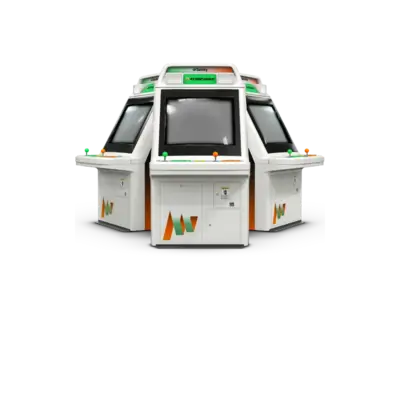

Overview
The Atomiswave is an arcade board developed by Sammy in 2003. Based on Sega's Dreamcast hardware, it shares the SH-4 CPU, PowerVR2 GPU and Yamaha AICA audio pipeline, allowing titles such as Metal Slug 6 and KOF Neowave to run with Dreamcast-level fidelity. Swappable cartridges and control panels let operators tailor the cabinet to shooters, fighters or racing games, and the system inherited SNK support following the retirement of Neo Geo MVS.
REG-Linux exposes the platform under both atomiswave and arcade groups so compatible themes can show the dedicated artwork set.
Technical specifications
- Manufacturer: Sammy
- Release year: 2003
- Hardware type: arcade
- CPU: Hitachi SH-4 RISC at 200 MHz
- RAM: 32 MB main, 16 MB video, 8 MB sound (on cartridge)
- Graphics: PowerVR2 GPU (496×384 up to 4,096 colors)
- Sound: Yamaha AICA (64-channel ADPCM + 45 MHz DSP)
Supported ROM extensions
lst, bin, dat, zip, 7z
Quick reference
- ROM folder:
/userdata/roms/atomiswave - Accepted formats:
.lst,.bin,.dat,.zip,.7z - Emulators: Flycast (standalone), libretro: Flycast
- System group:
atomiswave
BIOS
Flycast and libretro: Flycast require the Dreamcast-style Atomiswave BIOS. Copy the following archive into either the system ROM folder or your global BIOS path so REG-Linux can detect it:
| MD5 checksum | Share file path | Description |
|---|---|---|
0ec5ae5b5a5c4959fa8b43fcf8687f7c |
bios/dc/awbios.zip |
Atomiswave BIOS archive |
(REG-Linux versions prior to the DC-subfolder change may still look for bios/awbios.zip with the same checksum.)
ROMs
Store Atomiswave cartridges in /userdata/roms/atomiswave. Flycast will run both raw .bin dumps and archives containing the appropriate files.
Emulators
RetroArch (libretro: Flycast)
RetroArch hosts the libretro: Flycast core backed by the standalone emulator, giving you shared hotkeys, shaders, decorations and netplay. Open the Quick Menu ([HOTKEY] + south button) to adjust per-core settings. REG-Linux exposes features such as atomiswave.autosave, atomiswave.use_guns and atomiswave.cheevos for each session.
Key Flycast settings exposed via REG-Linux menus
- Synchronous rendering: toggle
global.reicast_synchronous_renderingto avoid flashing screens at the cost of performance. - Internal resolution: adjust
global.reicast_internal_resolution(native 640×480 up to 12×) to sharpen 3D models. - Texture filtering:
global.reicast_mipmapping,global.reicast_anisotropic_filtering,global.reicast_texupscaleandglobal.reicast_render_to_texture_upscalingcontrol filtering/upscaling quality. - Frameskip:
global.reicast_frame_skippingaccelerates weak hardware, though it may reduce smoothness. - Controller types:
global.controllerN_dclet you choose Gamepad/Lightgun/Mouse per Port. - Screen rotation:
atomiswave.screen_rotation_atomiswavesupports vertical shooters.
Flycast (standalone)
The original Flycast emulator shares the same core as the libretro build but runs outside RetroArch. REG-Linux surfaces the same standardized video and bezel settings (atomiswave.videomode, .bezel, .hud, etc.) along with Flycast-specific options such as naomi.flycast_render_resolution, naomi.flycast_renderer and atomiswave.flycast_anisotropic.
All other settings can be accessed through the RetroArch Quick Menu ([HOTKEY] + [south]) or, for the standalone emulator, by opening the Flycast configuration menu (press F1 in the Applications folder on the system screen).
Controls
Default Atomiswave input mapping appears on the REG-Linux Retropad overlay (../images/controller-overlays/atomiswave-1.png). Use the emulator menus to map guns, wheels or button-heavy layouts when needed.
Troubleshooting
- Verify
awbios.zipis present in a BIOS folder and matches the MD5 above; without it Flycast cannot boot Atomiswave games. - Confirm ROMs live under
/userdata/roms/atomiswaveusing one of the accepted formats.