Commodore 64
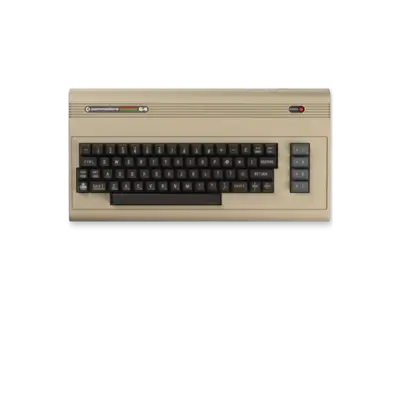

Overview
The Commodore 64 is one of the best-selling home computers ever. Released in 1982, it paired a 1 MHz MOS 6510 CPU with the VIC-II graphics and SID sound chips, giving it advanced graphics, smooth scrolling and legendary audio. REG-Linux treats the platform as the c64 group and runs multiple VICE variants plus specialized cores for the C64-DTV and SuperCPU enhancements.
Technical specifications
- CPU: MOS Technology 6510 at 1.023 MHz (PAL) / 0.985 MHz (NTSC)
- Memory: 64 KB RAM plus 20 KB ROM (BASIC, KERNAL, character data)
- Graphics: VIC-II chip with 320×200 resolution, 16 colors, hardware sprites and raster tricks
- Sound: SID 6581/8580 with three oscillators and programmable filters
Supported ROM extensions
d64, d71, d81, crt, prg, tap, t64, m3u, zip, 7z, nib, g64
Quick reference
- ROM folder:
/userdata/roms/c64 - Accepted formats:
.d64,.d81,.crt,.prg,.tap,.t64,.m3u,.zip,.7z - ROM metadata: filename can include tags such as
PAL,NTSC,JAPto hint the desired video mode - Emulators: libretro: VICE_X64 / VICE_X64SC, VICE: X64 / X64DTV / XSCPU64
- BIOS: built-in with VICE; no extra files needed
ROM details
Programs (.prg)
PRG files load directly into memory. Most titles are “crunched” and require some time to unpack, which is visible as flickering borders. Simply LOAD and RUN when prompted, or rely on the emulator to auto-run.
Cartridges (.crt)
Cartridges range from small 8 KB ROMs to bank-switched EasyFlash images. In the standalone VICE builds, attach a cartridge via the [START] → Cartridge → Attach CRT image menu. In RetroArch, use Advanced Game Options → Cartridge to specify the image so it loads automatically.
Tapes (.tap, .t64)
Tape images reproducethe original loading process. Use the virtual tape controls ([Select] for fast forward/rewind) or the separate Tape menu in standalone VICE. Many .t64 files wrap multiple programs—select the desired entry from the emulator’s UI.
Disks (.d64, .d81)
Load disk images with the classic LOAD "*",8,1 / RUN. Some multi-disk games can be grouped in .zip or .m3u playlists; RetroArch’s Disc Control menu (Quick Menu -> Disc Control) lets you swap disks ([HOTKEY] + [R2]/[L2]). Creating .m3u entries with custom labels (DISK_FILE|DISK_LABEL) helps identify each disk.
Saves
Define save disks by adding a #SAVEDISK: line to your .m3u playlist. RetroArch stores them under save/ using the playlist name; each #SAVEDISK slot generates a separate .d64 file representing an emulated floppy.
Emulators
The default is libretro: VICE_X64, which integrates well with REG-Linux. For higher accuracy use VICE_X64SC or the standalone VICE builds (X64, X64DTV, XSCPU64).
RetroArch configuration
Standardized features: c64.videomode, c64.ratio, c64.smooth, c64.shaders, c64.pixel_perfect, c64.decoration, c64.game_translation.
| ES setting name REG-Linux.conf_key | Description => ES option key_value |
|---|---|
GRAPHICS BACKEND c64.gfxbackend |
Select OpenGL (compatibility) or Vulkan (performance). |
AUDIO LATENCY c64.audio_latency |
Raise to combat pops/crackling, lower to reduce lag. |
THREADED VIDEO c64.video_threaded |
Offload video rendering; helps underpowered systems. |
Core-specific options
libretro: VICE_X64 exposes per-model options such as c64.c64_model, c64.external_palette, c64.aspect_ratio, c64.zoom_mode_c64, c64.vice_joyport, c64.vice_joyport_type, c64.keyboard_pass_through. Use these to match a PAL/NTSC board, choose joystick ports, or enable virtual keyboard shortcuts.
Standalone VICE
The standalone VICE builds (X64, X64DTV, XSCPU64) expose additional features like accurate soundchip emulation, DTV-specific enhancements or SuperCPU acceleration. They are useful for edge cases but require manual configuration via the emulator’s menu. REG-Linux still surfaces the basic c64.noborder zoom toggle and other shared keys.
Video modes and border handling
Switch between PAL/NTSC modes and toggle the zoom (hide borders) using Advanced Options. Use PAL for European releases, NTSC for US/Japanese titles. Zoom (hide borders) will cut off extra graphics that developers used for status bars—turn it off if you need the full border. Custom palettes are also settable per system or per game.
Controls
Default mappings were updated in REG-Linux v33 for accessibility. The Retropad maps to joystick directions, fire, special keys (Shift, Run/Stop, Restore), disk swapping and the virtual keyboard.

Special functions include [SELECT] for the virtual keyboard/status bar/fast forward, [L2]+[HOTKEY] and [R2]+[HOTKEY] for disk swapping, [L3] to swap joystick ports and [R3] to toggle the virtual keyboard. Use RetroArch’s Quick Menu or VICE’s input menu for further customization.
Troubleshooting
- Games may assume PAL timing; switch to PAL and enable HI-RES ARTIFACTING in the core options if the picture looks wrong.
- Some disks require selecting the right program manually via the emulator’s menu; refer to the manual for
LOADcommands if the wrong file starts. - Multi-disk titles benefit from
.m3uplaylists and the Disc Control menu (Quick Menu -> Disc Control). - If a cartridge fails, set it as the default via VICE’s Cartridge menu or assign it through Advanced Game Options.
- Consult the VICE documentation at https://vice-emu.sourceforge.io/vice_toc.html for deeper configuration details.