Gamate

Overview
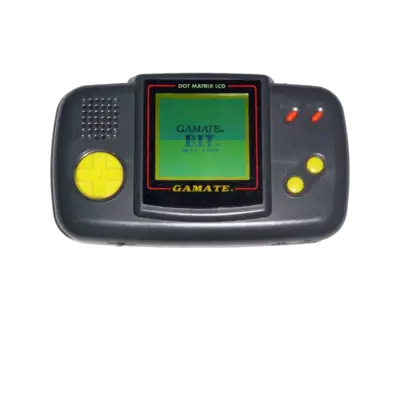
Bitcorp released the Gamate handheld in 1990. It surfaced under several aliases worldwide (Super Boy, Super Child, Watara Gamate, etc.), but the hardware stayed consistent: a Z80-based design with a monochrome 160×144 LCD sporting dithering for richer shades. REG-Linux scrapes metadata for the gamate system group and will load the matching theme set when one exists.
Technical specifications
- CPU: Zilog Z80A at 4 MHz
- Memory: 16 KB RAM, 8 KB video RAM
- Display: 160×144 monochrome LCD with dithering for more colors
- Sound: SN76489-style PSG with three channels plus noise
Supported ROM extensions
bin, zip, 7z
Quick reference
- Emulator: MAME
- ROM folder:
/userdata/roms/gamate - Accepted formats:
.bin,.zip,.7z - System group:
gamate
BIOS
Place gamate.zip (or .7z) inside /userdata/bios/gamate or the global BIOS share so MAME can find the required package. Filenames must remain untouched.
ROMs
Store zipped or raw Gamate ROMs in /userdata/roms/gamate. Leave archives zipped—MAME expects .zip or .7z containers rather than extracted folders.
Emulators
MAME
MAME reproduces the Gamate hardware. Use the in-game menu ([HOTKEY] + the south face button or Tab) to adjust inputs, DIP switches or other game settings. Visit the MAMEdev FAQ for the title if a specific ROM misbehaves.
Standardized options for this system include gamate.videomode, gamate.decoration and gamate.padtokeyboard, and EmulationStation exposes the following settings:
| ES setting name | REG-Linux.conf_key | Description & values |
|---|---|---|
| VIDEO MODE | gamate.video |
Choose BGFX, Accel or OpenGL rendering. |
| BGFX GRAPHICS API | gamate.bgfxbackend |
Pick BGFX backend (automatic/opengl/gles/vulkan). |
| BGFX VIDEO FILTER | gamate.bgfxshaders |
Apply shaders such as crt-geom, hq2x, eagle, etc. |
| CRT SWITCHRES | gamate.switchres |
Enable SwitchRes profiles (0 Off, 1 On). |
| TATE MODE | gamate.rotation |
Rotate for vertical displays (autoror, autorol). |
| ALT DPAD MODE | gamate.altdpad |
Reorient the d-pad for unusual controllers (DS3/X360). |
Controls
The default mapping follows the REG-Linux Retropad overlay. You can customize input per game through MAME’s configuration menu.

Troubleshooting
- Confirm
gamate.zipis installed underbios/orroms/gamate. - Try a different ROM dump if one fails to boot (some sets are incomplete).
- Consult the MAME troubleshooting section for driver-specific guidance.