Game Gear
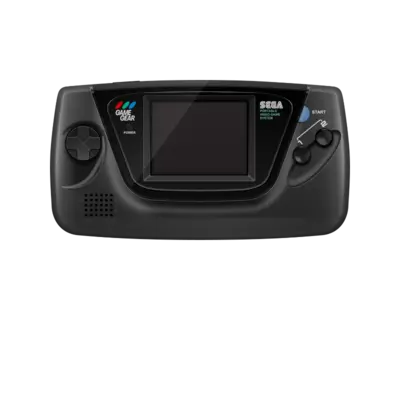

Overview
The Sega Game Gear was Sega's answer to Nintendo's Game Boy. Released in Japan on October 6, 1990, and later that year in North America and Europe, the portable system offered full-color graphics and a backlit LCD screen that stood out from the monochrome competition. Despite a higher price tag and middling battery life, the Game Gear carved a niche with its library of Sega-branded games and solid hardware.
In REG-Linux the Game Gear lives under the gamegear system group so metadata scraping and themes can treat every title uniformly. Compatible themes may load the dedicated gamegear visual set if it is available.
Technical specifications
- CPU: Zilog Z80 at 3.58 MHz (software compatible with Master System hardware)
- Memory: 8 KB RAM + 16 KB video RAM (mirrors the Master System video pipeline)
- Display: 160×144 backlit color LCD with 32 simultaneous colors drawn from a 4096 palette
- Sound: Texas Instruments SN76489A PSG with three square-wave channels plus noise
- Hardware type: portable
- Release year: 1990
- Manufacturer: Sega
Supported ROM extensions
bin, gg, zip, 7z
Quick reference
- Emulator: RetroArch
- Cores available: libretro: GenesisPlusGX, libretro: Picodrive
- ROM folder:
/userdata/roms/gamegear - Accepted ROM formats:
.bin,.gg,.zip,.7z - System group:
gamegear
BIOS
No Sega Game Gear emulator in REG-Linux requires a BIOS file.
ROMs
Place your Sega Game Gear ROMs in /userdata/roms/gamegear.
Emulators
RetroArch
RetroArch is the ubiquitous frontend that runs the libretro cores. RetroArch exposes a shared interface for shaders, overlays, hotkeys, rewinding, netplay and many other features independent of the underlying system.
RetroArch configuration
While a core is running, open the Quick Menu with [HOTKEY] + the south face button (see controller configuration). From here you can tweak core options, controller mappings and load/save states. REG-Linux also mirrors many of those options inside EmulationStation menus.
Standardized features available to all Game Gear cores include gamegear.videomode, gamegear.ratio, gamegear.smooth, gamegear.shaders, gamegear.pixel_perfect, gamegear.decoration and gamegear.game_translation.
| ES setting name | REG-Linux.conf_key | Description & values |
|---|---|---|
| GRAPHICS BACKEND | gamegear.gfxbackend |
Choose OpenGL (opengl) or Vulkan (vulkan). |
| AUDIO LATENCY | gamegear.audio_latency |
Buffer size in milliseconds: 256, 192, 128, 64, 32, 16, 8. Increase for pops/crackles, reduce once audio is stable. |
| THREADED VIDEO | gamegear.video_threaded |
Use an extra thread for video to boost performance at the cost of latency: true (On), false (Off). |
libretro: GenesisPlusGX
Genesis Plus GX is a highly compatible, open-source Sega 8/16-bit emulator. It handles Genesis/Mega Drive, Master System and Game Gear titles with accuracy in mind. REG-Linux bundles the libretro core so you can share overlays, hotkeys and shader chains across systems.
GenesisPlusGX configuration
| Setting | Key | Description & values |
|---|---|---|
| REDUCE SPRITE FLICKERING | global.gpgx_no_sprite_limit |
Set to enabled to reduce sprite flickering; disabled by default. |
| NTSC FILTER (Mega Drive) | megadrive.gpgx_blargg_filter_md |
Video filters: False (Off), composite, svideo, rgb. |
| SHOW LIGHTGUN CROSSHAIR (Mega Drive) | megadrive.gun_cursor_md |
Display crosshairs for Menacer/Justifiers: disabled, enabled. |
| CONTROLLER 1 TYPE (Mega Drive) | megadrive.controller1_md |
Pick 3/6 button pad, mouse, Teamplayer or Multitap combinations. |
| CONTROLLER 2 TYPE (Mega Drive) | megadrive.controller2_md |
Same choices plus Menacer/Justifier light guns. |
| NTSC FILTER (Master System) | mastersystem.gpgx_blargg_filter_ms |
Same filter list as Mega Drive. |
| FM CHIP (YM2413) | mastersystem.ym2413 |
Controls FM chip emulation: automatic, disabled, enabled. |
| SHOW LIGHTGUN CROSSHAIR (Master System) | mastersystem.gun_cursor_ms |
Enable Light Phaser crosshair: disabled, enabled. |
| CONTROLLER 1 TYPE (Master System) | mastersystem.controller1_ms |
Choose 2-button pad, Light Phaser, Paddle or Master Tap. |
| CONTROLLER 2 TYPE (Master System) | mastersystem.controller2_ms |
Same options as port 1. |
| LCD GHOSTING FILTER (Game Gear) | gamegear.lcd_filter |
Simulate the Game Gear's ghosting effect: disabled, enabled. |
| EXTENDED SCREEN (Game Gear) | gamegear.gg_extra |
Expand the visible playfield like on a Master System: disabled, enabled. |
libretro: Picodrive
Picodrive is a libretro core that targets Sega 8/16-bit accuracy on a broad range of hardware. It is widely used on SBCs and handhelds where performance is a concern.
Picodrive configuration
| Setting | Key | Description & values |
|---|---|---|
| REDUCE SPRITE FLICKERING | global.picodrive_sprlim |
Toggle sprite flickering reduction: disabled, enabled. |
| CROP OVERSCAN | global.picodrive_cropoverscan |
Crop the overscan area: disabled, enabled. |
| CONTROLLER 1 TYPE | global.picodrive_controller1 |
Choose a 3-button or 6-button pad. |
| CONTROLLER 2 TYPE | global.picodrive_controller2 |
Choose a 3-button or 6-button pad. |
Controls
Here is how the default Sega Game Gear layout maps onto a REG-Linux Retropad:

The default button mapping is also illustrated here:
