Game Boy Color

Overview
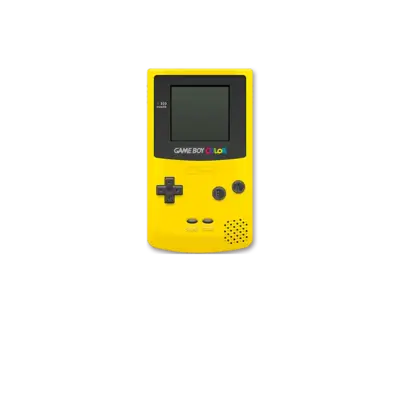
Nintendo released the Game Boy Color in November 1998. The handheld runs on a dual-speed Sharp LR35902 core (up to 8.19 MHz in color mode, 4.19 MHz in monochrome) and added a palette of 32,768 colors plus larger memory for richer sprites. REG-Linux groups every cartridge and ROM under the gbc system tag so metadata scraping, theming and visual sets stay consistent across the platform and its dot-matrix legacy.
Technical specifications
- Manufacturer: Nintendo
- Release year: 1998
- Hardware type: portable
- CPU: Sharp LR35902 running at up to 8.19 MHz (4.19 MHz for Game Boy compatibility)
- Memory: 32 KB internal work RAM (banked) and 16 KB video RAM for tile/palette data
- Display: 160×144 reflective LCD with up to 32,768 colors and 56 sprites per line
- Sound: Four-channel stereo (two square waves, one wave, one noise) with extended control compared to the original Game Boy
Supported ROM extensions
gbc, zip, 7z
Quick reference
- Emulator: RetroArch
- Cores available: libretro: Gambatte, libretro: mGBA, libretro: VBA-M, libretro: MesenS
- ROM folder:
/userdata/roms/gbc - Accepted ROM formats:
.gbc,.zip,.7z - System group:
gbc
BIOS
No BIOS file is required for Game Boy Color emulation in REG-Linux.
ROMs
Store all Game Boy Color ROMs inside /userdata/roms/gbc. Want to emulate two players? Read GBC2Players for build-in linking tips.
Emulators
RetroArch
RetroArch provides one interface with shaders, overlays, hotkeys, rewind, netplay and shared settings for every core. REG-Linux surfaces many of those controls inside EmulationStation menus as well.
RetroArch configuration
Open the Quick Menu with [HOTKEY] + the south face button (see controller configuration) while a core is running to adjust advanced options or per-game overrides.
Standardized settings exposed to every Game Boy Color core include gbc.videomode, gbc.ratio, gbc.smooth, gbc.shaders, gbc.pixel_perfect, gbc.decoration and gbc.game_translation.
| ES setting name | REG-Linux.conf_key | Description & values |
|---|---|---|
| GRAPHICS BACKEND | gbc.gfxbackend |
Choose OpenGL (opengl) or Vulkan (vulkan). |
| AUDIO LATENCY | gbc.audio_latency |
Buffer size in milliseconds: 256, 192, 128, 64, 32, 16, 8. Increase to resolve crackles, lower for tighter latency. |
| THREADED VIDEO | gbc.video_threaded |
Use a second thread for video processing (true On, false Off). |
libretro: Gambatte
Gambatte is a high-accuracy Game Boy Color emulator that relies on extensive hardware tests and documentation. REG-Linux includes the latest libretro core so you can benefit from its meticulous timing and compatibility.
libretro: Gambatte configuration
| ES setting name | REG-Linux.conf_key | Description & values |
|---|---|---|
| SHOW BIOS BOOTLOGO | global.gb_bootloader |
Show the boot animation when starting games (enabled, disabled). |
| GHOSTING EFFECT | global.gb_mix_frames |
Simulate the LCD ghosting of the original screen (disabled, mix, mix_fast, lcd_ghosting, lcd_ghosting_fast). |
| COLOR CORRECTION (GBC) | gbc.gbc_color_correction |
Adjusts colors to mimic real hardware (disabled, always). |
| COLORIZATION (GB) | gb.gb_colorization |
Pick a palette for original Game Boy games, including DMG palettes, GBC-style tints, Super Game Boy mixes and special palettes like TI-83 Legacy or WonderSwan. |
libretro: mGBA
mGBA focuses on speed and accuracy across Game Boy, Game Boy Color and Game Boy Advance titles. It earns its place here for GBC content that benefits from its fast interface and shared libretro tooling.
libretro: mGBA configuration
| ES setting name | REG-Linux.conf_key | Description & values |
|---|---|---|
| SHOW BIOS BOOTLOGO | global.skip_bios_mgba |
Show the BIOS animation when the BIOS file is present (True, False). |
| SUPER GB BORDERS (GB) | gb.sgb_borders |
Display Super Game Boy borders for compatible games (False, True). |
| COLOR CORRECTION (GB) | gb.color_correction |
Simulate the LCD color ink on original Game Boy titles (False, GBA). |
| SUPER GB BORDERS (GBC) | gbc.sgb_borders |
Enable Super Game Boy borders for GBC content (False, True). |
| COLOR CORRECTION (GBC) | gbc.color_correction |
Simulate accurate GBC colors (False, GBC). |
| SOLAR SENSOR LEVEL | gba.solar_sensor_level |
For Boktai-style cartridges, adjust the solar sensor value (0 through 10). |
| FRAMESKIP | gba.frameskip_mgba |
Skip extra frames to help performance (0 through 10). |
libretro: VBA-M
VBA-M is the continuation of VisualBoyAdvance with expanded palette, debugging and filtering options for Game Boy, Game Boy Color and Game Boy Advance titles.
libretro: VBA-M configuration
| ES setting name | REG-Linux.conf_key | Description & values |
|---|---|---|
| COLORIZATION (GB) | gb.palettes |
Choose from many color palettes such as original gameboy, black and white, gba sp, blue sea, dark knight, green forest, hot desert, pink dreams, weird colors, plus dozens of Super Game Boy and special palettes. |
| COLOR CORRECTION (GB) | gb.gbcoloroption_gb |
Simulate original LCD color inaccuracies (disabled, enabled). |
| SUPER GB BORDERS (GB) | gb.showborders_gb |
Show Super Game Boy borders (disabled, enabled). |
| COLOR CORRECTION (GBC) | gbc.gbcoloroption_gbc |
Simulate GBC LCD imperfections (disabled, enabled). |
| SUPER GB BORDERS (GBC) | gbc.showborders_gbc |
Enable Super Game Boy borders for GBC (disabled, enabled). |
| SOLAR SENSOR LEVEL | gba.solarsensor |
Adjust the Boktai solar sensor input (0 through 10). |
| SENSOR SENSITIVITY (GYRO) | gba.gyro_sensitivity |
Adjust gyro input, values range from 10 to 120. |
| SENSOR SENSITIVITY (TILT) | gba.tilt_sensitivity |
Adjust tilt input for Gyro-enabled games (10 to 120). |
libretro: MesenS
Although MesenS is technically a SNES emulator, it can launch Game Boy Color games through the Super Game Boy interface when the proper BIOS files exist. Load ROMs from roms/sgb and the emulator will boot them as if you played them on the SNES accessory.
Controls
Game Boy Color titles adopt the default REG-Linux Retropad layout. Use the controller configuration menus to adjust mappings per core or per game if needed.