Game Master

Overview
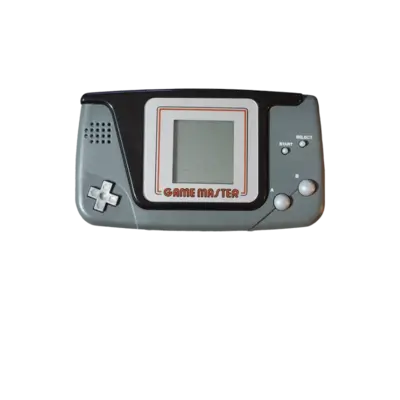
The Hartung Game Master debuted in 1990 as an affordable portable hardware platform that went by many names worldwide (Hartung Game Tronic, Hartung Super Game, Systema 2000, Videojet Game Master, Prodis PDJ-10, Impel Game Master, Watara Game Master, Game Plus). REG-Linux groups all related ROMs under the gmaster system tag so metadata scraping and themes stay consistent with the platform.
Technical specifications
- Manufacturer: Hartung
- Release year: 1990
- Hardware type: portable
Supported ROM extensions
bin, zip, 7z
Quick reference
- Emulator: MAME
- ROM folder:
/userdata/roms/gmaster - Accepted ROM formats:
.bin,.zip,.7z - System group:
gmaster
BIOS
Place gmaster.zip (or the zipped BIOS archive) inside /userdata/bios/gmaster or the BIOS share folder so MAME can find the required ROM image.
ROMs
Store every Game Master ROM inside /userdata/roms/gmaster.
Emulators
MAME
MAME (Multiple Arcade Machine Emulator) reproduces the Game Master hardware. Unlike RetroArch, MAME relies on ROM metadata included in the set rather than individual cores per system.
MAME configuration
Press [HOTKEY] + the south face button (or [Tab] on a keyboard) inside a title to open the in-game menu, where you can edit inputs, dip switches or apply game-specific fixes. Check the MAMEdev FAQ if a particular game misbehaves.
Standardized MAME options exposed on REG-Linux include gmaster.videomode, gmaster.decoration and gmaster.padtokeyboard.
| ES setting name | REG-Linux.conf_key | Description & values |
|---|---|---|
| VIDEO MODE | gmaster.video |
Choose BGFX post-processing, Accel, or OpenGL rendering. |
| BGFX GRAPHICS API | gmaster.bgfxbackend |
Pick the backend when BGFX is active (automatic, opengl, gles, vulkan). |
| BGFX VIDEO FILTER | gmaster.bgfxshaders |
Apply shaders like default, crt-geom, crt-geom-deluxe, eagle, hlsl, hq2x, hq3x, hq4x. |
| CRT SWITCHRES | gmaster.switchres |
Let MAME use switchres profiles (0 Off, 1 On). |
| VERTICAL ROTATION (TATE) | gmaster.rotation |
Rotate the display for TATE titles (autoror, autorol). |
| ALT DPAD MODE | gmaster.altdpad |
Adjust the d-pad orientation for your controller. |
Controls
The default Game Master mapping follows the REG-Linux Retropad overlay. Adjust the layout per system through REG-Linux or MAME input menus.
Troubleshooting
If a Game Master title behaves oddly, consult the MAME troubleshooting section.