MSX1
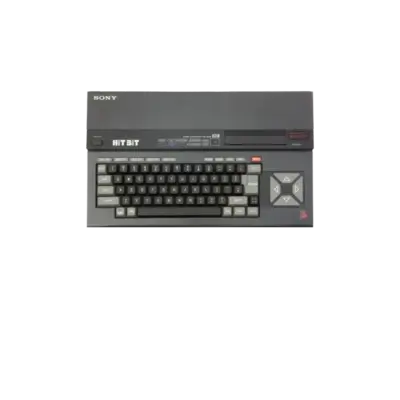

Overview
Microsoft’s MSX1 standard debuted in 1983 and laid the foundation for a compatible home-computer ecosystem. REG-Linux associates it with the msx platform group so themes and metadata stay consistent.
Quick reference
- ROM folder:
/userdata/roms/msx1 - Accepted ROM formats:
.dsk,.mx1,.rom,.zip,.7z,.cas,.m3u - Emulators: RetroArch (
libretro: bluemsx,libretro: fmsx), openMSX, CLK - System group:
msx
| Emulator/Core | Notes |
|---|---|
libretro: bluemsx |
Accurate MSX1 emulation with sprite-limit removal, rewinding and achievements |
libretro: fmsx |
Lightweight compatibility core that adds netplay |
openmsx |
Official openMSX implementation carried by the openmsx package |
CLK |
Clock Signal provides a low-latency MSX1 option on REG-Linux 42+ |
Technical specifications
- CPU: Zilog Z80A running at 3.58 MHz (or compatible clones) with 8-bit bus.
- Memory: Base 64 KB RAM (banks of 16 KB) expandable via mapper cartridges.
- Display: Texas Instruments TMS9918 video chip delivering 256×192 resolution, 16 colors out of 32, and 32 sprites.
- Sound: General Instrument AY-3-8910 PSG providing three square-wave channels and one noise channel.
Supported ROM extensions
dsk, mx1, rom, zip, 7z, cas, m3u, ogv, openmsx
ROMs
Store every MSX1 title inside /userdata/roms/msx1. Wrap multi-disk games in .m3u playlists so
EmulationStation shows a single entry (see /cd_image_formats#multi-disc_games).
BIOS
BlueMSX
Fetch the standalone BlueMSX release from http://bluemsx.msxblue.com/rel_download/blueMSXv282full.zip. After unpacking, drop the Databases
and Machines directories into /userdata/bios so RetroArch can reference the bundle.
FMSX / Generic MSX ROMs
FMSX relies on plain ROM dumps; copy the list below from the distribution into /userdata/bios:
CARTS.SHA
CYRILLIC.FNT
DISK.ROM
FMPAC.ROM
FMPAC16.ROM
ITALIC.FNT
KANJI.ROM
MSX.ROM
MSX2.ROM
MSX2EXT.ROM
MSX2P.ROM
MSX2PEXT.ROM
MSXDOS2.ROM
PAINTER.ROM
RS232.ROM
openMSX fallbacks
openMSX looks for its BIOS images in the following directories:
/userdata/system/configs/openmsx/share/systemroms/userdata/bios/Machines/userdata/bios/openmsx
Emulators
RetroArch
RetroArch hosts libretro: bluemsx and libretro: fmsx for MSX1 hardware. Shared options include
msx1.videomode, msx1.ratio, msx1.shaderset, msx1.smooth, msx1.integerscale, msx1.bezel,
msx1.bezel_stretch, msx1.hud, msx1.bezel.tattoo, msx1.bezel.tattoo_corner,
msx1.bezel.tattoo_file, msx1.bezel.resize_tattoo, msx1.ai_service_enabled, msx1.ai_target_lang,
msx1.ai_service_url, msx1.ai_service_pause, msx1.runahead, msx1.secondinstance,
msx1.video_frame_delay_auto, msx1.vrr_runloop_enable, msx1.video_threaded.
libretro: bluemsx
blueMSX exposes rewinding, autosave, pad-to-keyboard and achievement toggles (msx1.rewind, msx1.autosave,
msx1.padtokeyboard, msx1.cheevos) as well as global.bluemsx_nospritelimits to disable the four-sprites-per-line limit.
libretro: fmsx
fMSX mirrors the same standard options and additionally enables msx1.netplay.
openMSX
openMSX is packaged when you install openmsx. It downloads the same BIOS set as
blueMSX/FMSX and reuses the msx1.* option group for video, bezels, AI service and controller mapping.
CLK
CLK (REG-Linux 42+) offers an alternative low-latency MSX1 route using the same BIOS files and option group described above.
Controls
The default MSX1 layout is mapped on the REG-Linux RetroPad overlay.
Troubleshooting
If problems persist, consult the generic support pages.