PDP-1

Overview
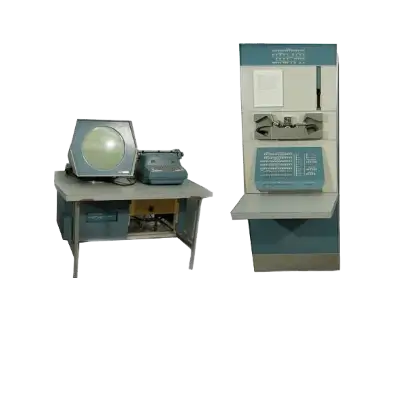
The DEC PDP-1 (Programmed Data Processor-1) debuted in 1961 and gained fame for vector titles like Spacewar! and its front-panel switches. REG-Linux collects PDP-1 metadata under the pdp1 tag so the unique artwork shows up correctly.
Quick reference
- ROM folder:
/userdata/roms/pdp1 - Accepted formats:
.zip,.7z,.tap,.rim,.drm - Emulator: MAME /
libretro: mame - System group:
pdp1
Technical specifications
- CPU: 18-bit DEC PDP-1 processor at 200 kHz.
- Memory: 4 KB of core memory to start, expandable via cabinets and modules.
- Display: Vector CRT capable of 1024 vertical points with a light-pen input.
- Sound: Simple control panel buzzer for timing cues.
ROMs
Drop PDP-1 tapes or disk packs into /userdata/roms/pdp1. Text-based tape games such as Spacewar! can take several seconds to load—watch the blinking lights and wait until the machine finishes. If you only have one controller, it will serve both players in split-control games; plug in a second pad when possible.
Emulators
RetroArch / libretro: mame
RetroArch hosts libretro: mame for PDP-1 titles. Use the Quick Menu ([HOTKEY] + south face button) to adjust video, input, or latency options, or use EmulationStation’s advanced settings for features such as pdp1.autosave, pdp1.netplay, and pdp1.padtokeyboard.
Key global MAME options include CPU overclock (global.mame_cpu_overclock), rendering resolution (global.mame_altres), artwork cropping (global.artworkcrop) and the PDP-1 software list selector (pdp1.softList).
Standalone MAME
The standalone MAME binary mirrors the RetroArch setup with direct access to the in-game menu ([HOTKEY] + south, or [Tab]). It exposes the full MAME option set including pdp1.videomode, pdp1.bgfxbackend, pdp1.switchres, and custom per-game overrides.
Controls
PDP-1 titles typically rely on simple joysticks/keyboard combinations. Save a custom remap through /remapping_controls_per_emulator when player order needs adjusting.
Troubleshooting
- Allow space for tape loads—if the green lights blink the console is still reading.
- Connect two controllers for Spacewar!; otherwise the single pad controls both ships.
- Consult the generic support pages or the generic arcade guide for additional assistance.