Commodore PET

Overview
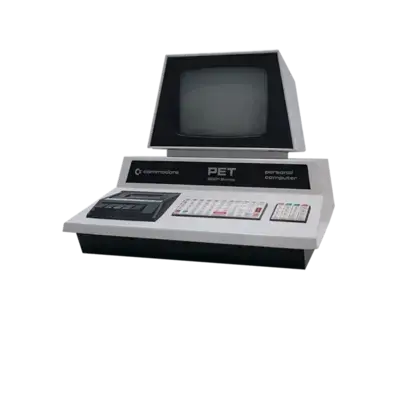
The Commodore PET (Personal Electronic Transactor) launched in 1977 as an all-in-one business/home computer. It coupled a monitor, keyboard, and cassette interface in a single chassis, and PAL-based America Online programs drove early computing. REG-Linux assigns PET titles to the pet system so art and metadata track the dedicated folder.
Quick reference
- ROM folder:
/userdata/roms/pet - Accepted formats:
.a0,.b0,.crt,.d64,.d81,.prg,.tap,.t64,.m3u,.zip,.7z - Emulators: Standalone VICE (
xpet),libretro: vice_xpet - System group:
pet
Technical specifications
- CPU: MOS Technology 6502 at 1 MHz.
- Memory: 4–32 KB of RAM plus ROM containing BASIC.
- Display: Built-in monochrome screen (40×25 or 80×25 when expanded) driven by a VIC-style controller.
- Sound: VIA 6522-generated beeps for simple feedback.
BIOS
VICE/vice_xpet ships with the required ROM set, so no manual BIOS installation is necessary.
ROMs
Store PET software inside /userdata/roms/pet. The VICE core accepts an array of cartridge, disk and tape formats listed above—vice_xpet detects whichever image you launch.
Emulators
Standalone VICE
The native VICE xpet binary gives the most accurate PET experience with direct access to switches and the built-in keyboard. Shared options include pet.videomode, pet.padtokeyboard, pet.bezel and pet.hud. Use pet.noborder to crop the vintage border if you prefer a fullscreen image.
RetroArch / libretro: vice_xpet
RetroArch's libretro: vice_xpet mirrors the standalone accuracy while running inside the RetroArch shell. It exposes pet.rewind, pet.autosave, pet.padtokeyboard, plus global VICE options such as:
global.pet_model: pick the PET variant (8032, 2001, 8296, SuperPET, etc.).global.vice_pet_external_palette: simulate green/amber/white phosphor colors.global.vice_aspect_ratio: force PAL or NTSC ratios.global.vice_zoom_mode: crop the borders or zoom the display automatically.global.vice_retropad_options: adjust button behaviors.global.vice_joyport/global.vice_joyport_type: map joystick ports and devices (joystick, paddles, mouse, etc.).global.vice_keyboard_pass_through: let controller input pass through to the OS.
Controls
PET titles rely on the integrated keyboard and optionally the analog joystick in port 2. Use the overlay described at ../images/controller-overlays/pet.png or remap keys manually via /remapping_controls_per_emulator.
Troubleshooting
- If a program won't load, extract archives before launching and try the plain
.prg/.d64. - Use
global.vice_zoom_modewhen the picture shows black borders. - See the generic support pages for additional help.