Sega Pico
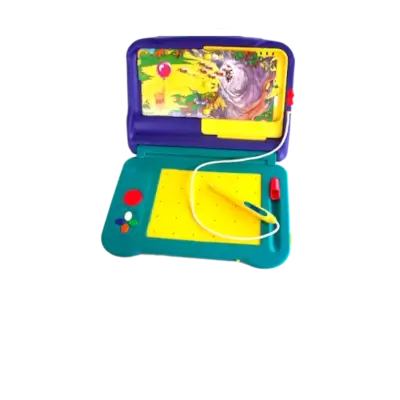

Overview
The Sega Pico launched in 1993 as a child-friendly “edutainment” device that combined cartridge-based games with a stylus-driven book interface. Hardware-wise it mirrors the Mega Drive/Genesis, and REG-Linux keeps its ROMs under the pico metadata group so themes show the right art.
Technical specifications
- Manufacturer: Sega
- Release year: 1993
- Hardware type: console
- EmulationStation group: megadrive
Quick reference
- ROM folder:
/userdata/roms/pico - Accepted formats:
.bin,.md,.zip,.7z - Emulators:
libretro: genesisplusgx,libretro: genesisplusgx-wide,libretro: picodrive - System group:
pico
ROMs
Drop Sega Pico binaries (.bin, .md) into /userdata/roms/pico. Avoid packing the files inside unsupported archives—if a game refuses to run, unzip the ROM so the core can recognize it. The Pico behaves like a Mega Drive cartridge, so keep the folder separate from the CD lineup.
Emulators
RetroArch
RetroArch runs the Pico-focused libretro cores. The Quick Menu ([HOTKEY] + south face button) allows you to adjust shaders, overrides and controller mappings, while EmulationStation mirrors the shared settings such as pico.rewind, pico.autosave, pico.netplay, and pico.cheevos.
libretro: genesisplusgx / genesisplusgx-wide
Both GenesisPlusGX builds support Pico titles. Key options:
global.gpgx_region: ensure NTSC/PAL matches the original release.global.gpgx_no_sprite_limit: remove the hardware sprite cap for smoother scrolling.
libretro: picodrive
Picodrive is an alternative with similar accuracy and additional toggles:
global.picodrive_sprlim: disable the 80-sprite-per-line limit.global.picodrive_cropoverscan: crop noisy overscan edges.global.picodrive_controller1/2: choose 3-button or 6-button pad mappings.
Controls
The Pico pad resembles a Mega Drive controller with an alphabet dial. REG-Linux maps this layout automatically; create a manual remap via /remapping_controls_per_emulator if a game requires special bindings.
Troubleshooting
- Switch between
genesisplusgx,genesisplusgx-wide, andpicodriveif a title refuses to launch. - Consult the generic support pages when additional help is needed.