Atari XE Game System (XEGS)
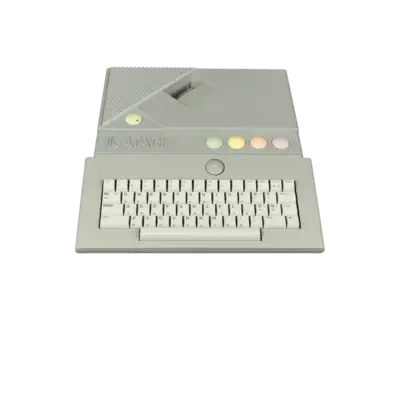

Overview
The Atari XE Game System packages the Atari 8-bit XE hardware inside a console-friendly shell, shipping with a joystick and a cartridge slot. REG-Linux exposes the xegs metadata group so you can keep the core library separated from the rest of the Atari lineup.
Technical specifications
- Manufacturer: Atari
- Release year: 1987
- Hardware type: computer
- EmulationStation group: atari8bit
Quick reference
- ROM folder:
/userdata/roms/xegs - Accepted formats:
.atr,.dsk,.xfd,.bin,.rom,.car,.zip,.7z - Emulators:
libretro: mess,MAME - System group:
xegs
BIOS
Pack the required DIVIDE/XL BIOS into /userdata/bios/xegs.zip. The archive should contain the Atari ROM files (0a, 2a, 4a, etc.) that the XEGS firmware expects when it boots.
| Description | File |
|---|---|
| XEGS BIOS bundle | bios/xegs.zip (includes c101687.rom, etc.) |
ROMs
Store cartridges or disk dumps in /userdata/roms/xegs. The XEGS uses the same formats as the 400/800 family—.car and .atr titles work flawlessly, and the RetroArch mess core can open zipped archives as long as the image sits at the archive root.
Emulators
libretro: mess
Use the RetroArch Quick Menu ([HOTKEY] +  ) to tweak
 mess.* video and input options. Enable global.mame_cpu_overclock only when a game refuses to run at full speed, and rely on global.altdpad when you want additional directions for multidirectional joysticks.
MAME driver
REG-Linux also ships a native MAME driver entry for XEGS, which reads the same BIOS archive; the front end simply launches it as another available emulator.
Controls
The default overlay shows the Atari two-button layout. Rebind buttons through the Quick Menu or by editing the RetroArch config if you prefer Mega Drive-style placement.
Troubleshooting
- Make sure
/userdata/bios/xegs.zipexists and containsc101687.rom; the emulator will not start otherwise. - If a disk image refuses to launch, try renaming or extracting it to force RetroArch to see the proper header.
- Consult the generic support pages for general RetroArch or MAME suggestions.